Where did QFARM go in Xenapp 7.5, 7.6?
During the management of a xenapp 7 x environment I wanted a qfarm overview. I found out that this command no longer works. Why not?
This is because Xenapp 7.x uses the FMA protocol instead of the old IMA protocol.
How do I go to my qfarm overview?
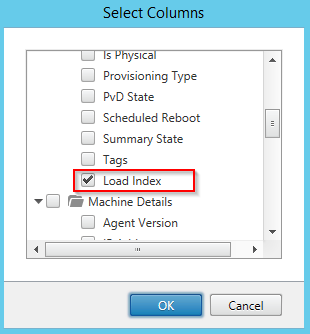
Through the Studio console
In the studio you can add an extra column “load index”. After doing that you get an extra column with a nice overview of the load index


With Powershell
Add-PSSnapin citrix.*
Get-BrokerMachine | select-object Dnsname.Loadindex.WindowsConnectionSetting.SessionCount | ft –AutoSize

The PowerShell command is a quite long, to make it easy for ourselves we can create an alias.
Add-PSSnapin citrix.*
set-alias qfarm Qfarm-Load
function Qfarm-Load {Get-BrokerMachine -SessionSupport MultiSession -Property dnsName,loadIndex,SessionCount}
Qfarm-Load
If you want to do an “Qfarm output” export to a textfile:
Qfarm-load | format-table -auto | Out-File -Encoding ASCII \\“servername”\c$\Temp\Farmload.txt -Width 150

Was once an enthusiastic PepperByte employee but is now working elsewhere. His blogs are still valuable to us and we hope to you too.